
Maximizing Home Locations
Home Location is an important setting in the item record. Home Location drives the location message in the public catalog. Combined with the Call Number, Home Location tells patrons where to find the item. Call number tells the user where to look on the shelf, Home Location says where the shelf is in your library.
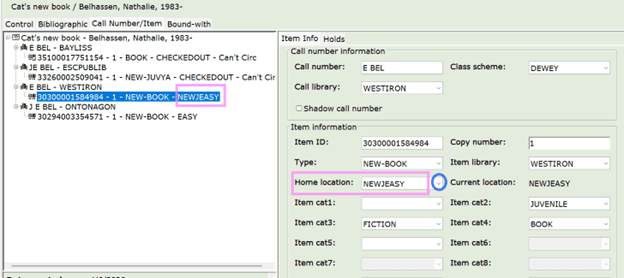
An item record. Pink box shows the Home Location.
To change Home Locations, select from the drop-down menu in the Call Number and Item ID wizard. In this example, NEWJEASY is the choice that is expressed as “New Juvenile Easy Picture Book” in West Iron District Library’s public catalog.
Your Call Number patterns probably give you enough information to find items if you have a small collection, but Home locations help users who aren’t as familiar with your collections as you are.
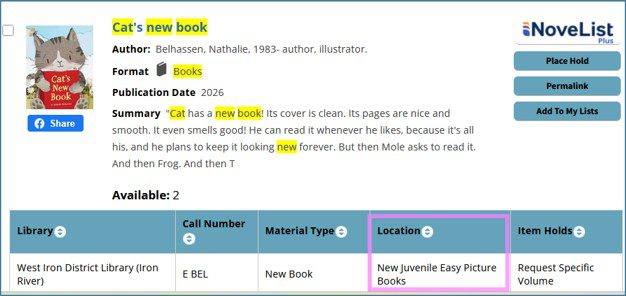
View of the same record in the Online Public Access Catalog.
Using Home Locations for spring cleaning.
If you’re not familiar with your library’s Home Locations or if you see some Home Locations in your drop-down menu that look strange to you, you can request a list from us with the number of items in each location (email your request to support [at] superiorlandlibrary.org). The list of Home Locations we send you might look something like this:
1 ABIO|
1 ACASSBOOK|
2 AFIC|
2 ANF|
9 ASKDESK|
2 BIO|
29 DISCARD|
52 EASYNF|
1 EASYPIC|
840 EASY|
1940 ELMEVERY|
The number on the left of the Home Location is the number of items in your collection that are set to that Home Location. I’d wager that all the Home Locations in green typeface abovearen’t in current use. Note any location in your list that you suspect isn’t used by your library and request a shelf list for that location (email request to support [at] superiorlandlibrary.org). The shelf list will display the titles and call numbers and item ID (library barcode). You could then hunt the items down in your library, withdraw the item if you think it’s long gone, set to missing if you can’t find it but think it might still turn up, or update the home location in the item record if it’s wrong. With back-end reports and settings, we can delete any home location you aren’t using, and we can merge the contents of a home location that is out of date into the home location that is in use.
Stacks: The default Home Location is “Stacks”. (Stacks is library lingo for library shelving.) If you have a very tiny library and everything is shelved in one consecutive set of shelves, then “Stacks” is the only Home Location you need. But once you start dividing your collection into categories – Adult, Juvenile, Fiction, Non-fiction, Graphic Novels, DVD’s, Children’s, Teens, you won’t want to use “Stacks”.
Usually if you inherit a collection with a large quantity of items with a home location of “Stacks,” it’s a good indication that the people adding items before you were never properly trained. As we’ve already invested the time and money to provide a system that can give better information than “Yeah, we have that item; it’s here somewhere,” it’s worthwhile to find a home location for all your items in stacks. If you use consistent call number patterns, that can help identify how to sort your Stacks items into meaningful Home Locations. If your records contain designations such as fiction and nonfiction and interest age level, these changes might be managed with a report. We can work with you. It might seem like a huge undertaking, but it could prove to be easy to manage with very satisfying results.
Inventory: A shelf list (Titles listed by call number) of a Home location is useful for inventory. Again, reach out to support [at] superiorlandlibrary.org anytime you’re ready to start an inventory project. Items that are missing can be set to missing. Items that look like they’ve hit end- of-life can be withdrawn. Items that have been misfiled can be squared away.
A dusty shelf list for a Home Location lists titles that haven’t circulated in a given amount of time. Often those are easy books to withdraw from the collection and put on a “free table,” donate, recycle or put in a Friends sale to make room for new books.
Shifting collections. Formats go in and out of style. Anytime someone has an itch to move things around—separate the paperbacks for the hardcovers in your fiction collection, or merge the paperbacks into the hardback fiction collection, you will want to adjust the Home Locations. Do you want to add a graphic novel collection or divide the graphic novel collection you have into reading level or fiction and non-fiction? Again, some of these changes can be made easily on the back end by running a batch change. Some of these changes can be made easily with the global item modification wizard and a barcode scanner. If the steps aren’t intuitive to you, please reach out. We’re here for you.
-
Latest News
 Registration open for the 2026 UPRLC Annual ConferenceMay 20, 2026This year’s theme is The Next Chapter! Register here: UPRLC Conference Registration SEPTEMBER 21-22, 2026 AT NORTHERN MICHIGAN UNIVERSITY […]
- Superiorland Library Cooperative’s New Director: Tricia WylieAugust 22, 2025Welcome Tricia! Tricia Wylie is Superiorland Library Cooperative’s new director. Tricia comes to us from the New River Public Library Cooperative, a small […]
- UPRLC Board of Directors Regular Meeting ScheduledApril 15, 2024The next regular meeting of the UPRLC Board of Directors will be held on Monday, June 3, 2024 at 11 AM Central/12 Noon Eastern. The meeting will be held via Zoom […]
- UPRLC Board of Directors Regular Meeting ScheduledMay 22, 2023The next regular meeting of the UPRLC Board of Directors will be held on Tuesday, May 30, 2023 at 12 PM Central/1 PM Eastern. The meeting will be held via Zoom […]